
Route planning for cash on delivery distribution
OptiRoutes handles cash on delivery from the stop to the accountant: cash customers are marked in the driver app, the driver records cash and cheques collected with a reason for any gap, declares the totals at the end of the day, and the cash desk counts and closes each driver's day customer by customer, with receipts e-mailed to paying customers.
Updated:
What does a day look like in a cash on delivery operation?
In many distribution businesses a share of the customers still pay the driver: small grocers, kiosks, market stalls and restaurants that pay in cash or by cheque on delivery. That money is part of the route. The driver has to know which customers pay, how much each one owes, and what to do when a customer pays less or pays later. Without a system, this lives on paper notes in the cab.
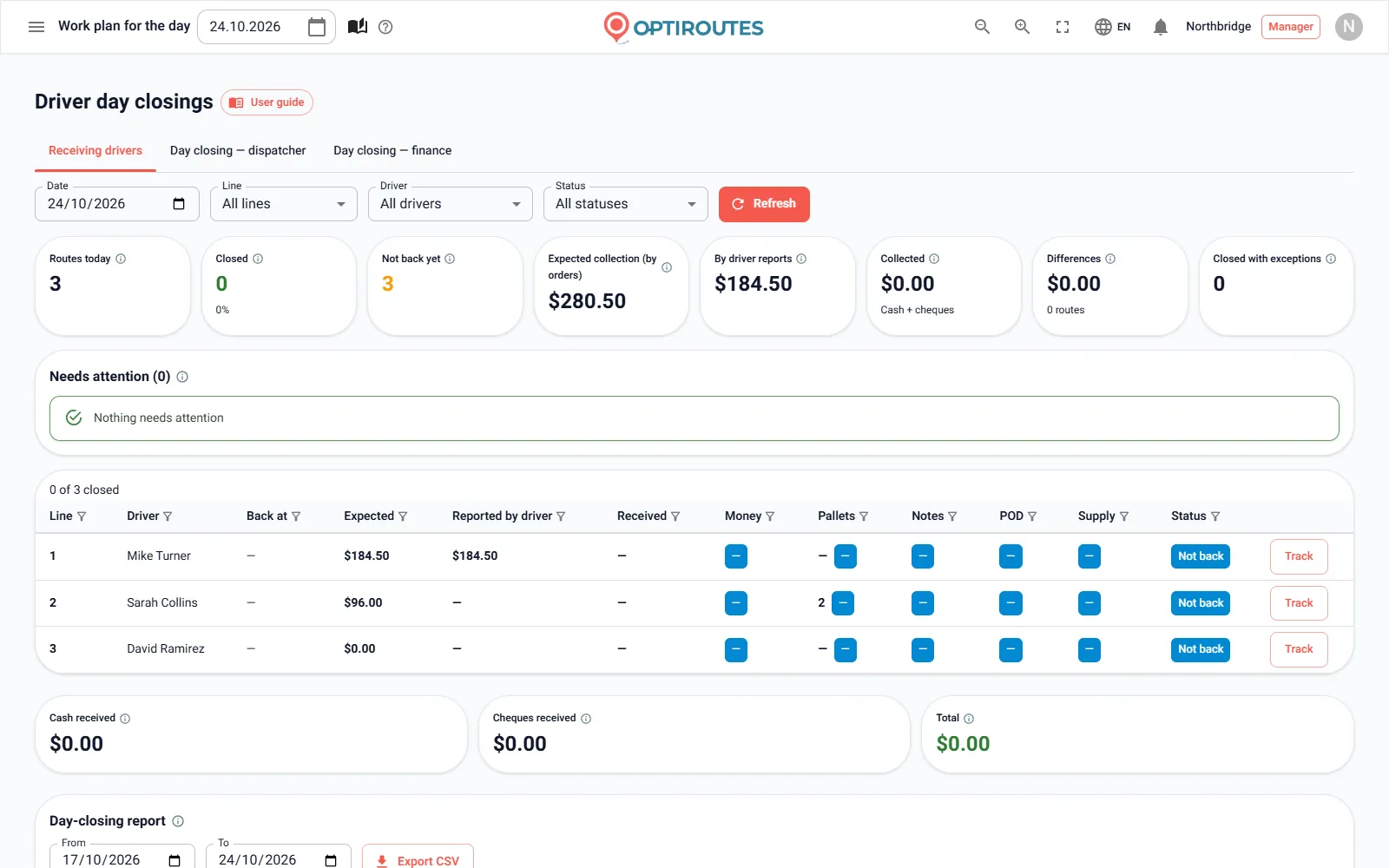
The office has the harder end. When the drivers return, someone has to receive each one: count the money, check the cheques, compare them with what was due, collect the signed delivery notes and the returned pallets, and find out why route 4 is short by a few hundred. Then the dispatcher hands the day's cash to finance, finance counts what it received from all dispatchers, and accounting wants a report per day, per driver and per month.
Every step is a chance for a gap that nobody can explain a week later. The aim is simple: every amount recorded once, at the source, and every gap with a reason and a name.
Which OptiRoutes features matter most for cash on delivery?
- Cash customers by name. A customer whose name contains the word for cash — in your language or in Hebrew — is a cash customer, marked with a currency sign in the driver's stop list. Nothing else to set up.
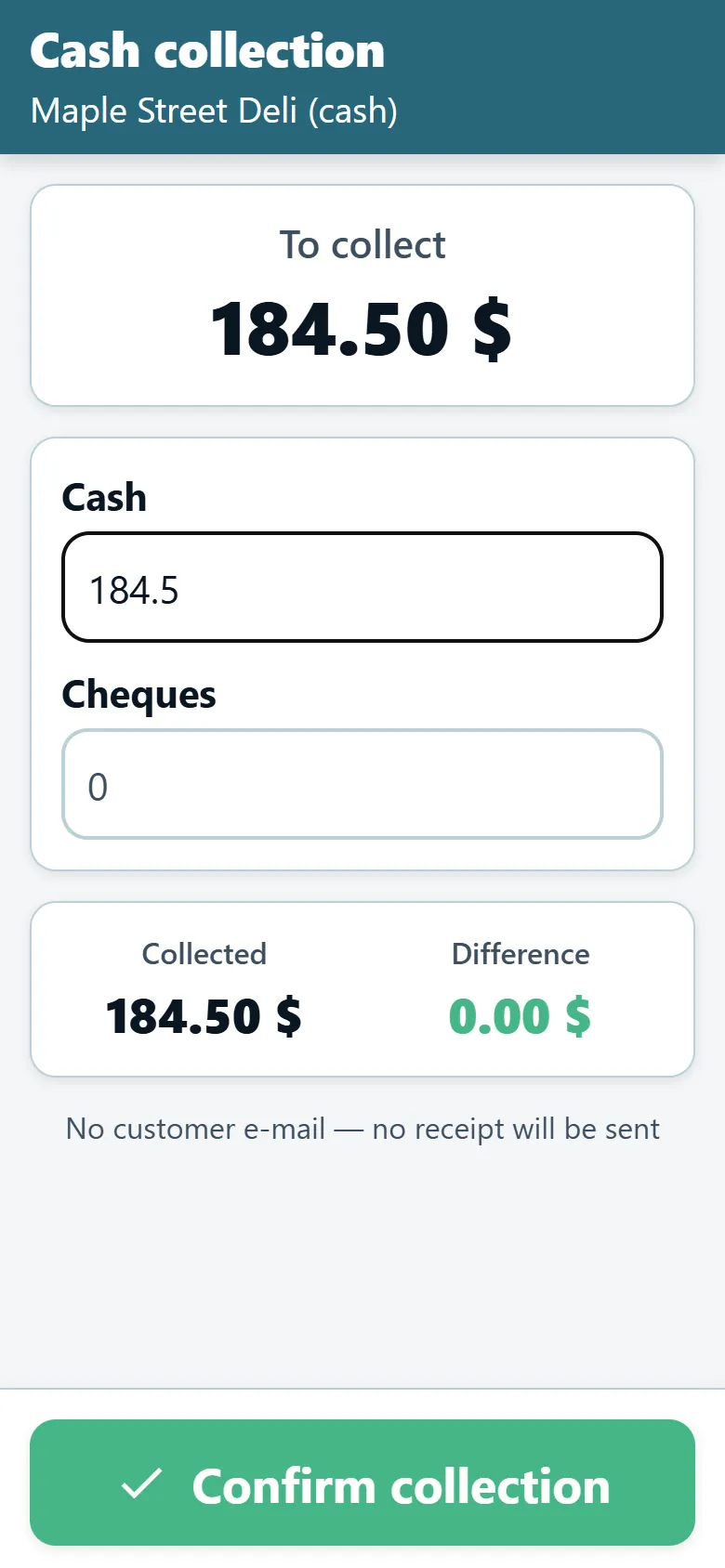
- Collection alert at arrival. Marking arrival at a cash customer opens an alert with the amount due per the order. Without a price on the order, the alert shows "amount unknown" and the driver enters what was collected.
- Cash, cheques and a reason for every gap. The collection screen takes cash, the cheques amount, the number of cheques and a free note. When the collected amount differs from the amount due, the app requires a reason from your list of cash gap remarks.
- End-of-day declaration. The app shows the totals per the reports, and the driver declares what they actually bring back. The route then becomes "awaiting closing" at the cash desk.
- The cash desk. A daily dashboard with every route, its amounts, five checks — money, pallets, notes, POD and supply — and its status: not back, awaiting closing, draft, closed, closed with exception, needs attention. See cash and day closing.
- Receiving the driver customer by customer. Per customer: the documents with a V button per check (for example a red stamp), the cash and cheques received against the driver's report, and the live gap.
- Dispatcher and finance closings. The dispatcher closes their day and hands cash and cheques to finance; finance closes the finance day against every dispatcher handover of the date.
- Receipts and confirmations by e-mail. After the day is closed, every paying customer gets a receipt with the amount, date and route, and the driver gets a deposit confirmation.
- Reports for accounting. A range report of every closing with day subtotals and a CSV export, and a finance closings table with totals.
What happens when a closed day turns out to be wrong?
A closed day is read-only. Only a manager can reopen it, with a written reason; the day returns to draft with the current numbers, and who reopened it, when and why goes into the closing notes. A finance user can close but not reopen. Once the finance day of a date is closed, no dispatcher closing of that date can change until a manager reopens the finance day first. Every closing keeps who closed it, when, who received the driver, every amount, reason and note.
Roles keep the work separated: finance lands on the cash desk after sign-in and updates the finance closing; a dispatcher receives drivers and closes their own day, and sees the finance part view only; a manager does everything; planners do not see the cash desk.
How does the dispatcher hand the cash to finance?
Once the dispatcher has received their drivers, they close their own day: how much cash, how much in cheques and how many cheques they hand over to finance. The cards show what they received from the drivers closed on that date, routes not yet received are listed in red, and a difference needs a written reason. "Close to accounting" hands over exactly what was received from the drivers today and closes the dispatcher's day in one tap.
Finance then reports what it actually received in the finance day closing — one per day, against every dispatcher handover of the date. A monthly report for the accountant is one CSV export from the finance closings table, with cash and cheques apart, counts, differences and reasons.
Which KPIs should a cash on delivery operation track?
An illustrative example with fictional numbers for a distributor whose 10 drivers collect cash daily. It is not a claim about any OptiRoutes customer.
| KPI | Where you see it in OptiRoutes | Illustrative week |
|---|---|---|
| Days closed with an exception | Cash desk, "Closed with exceptions" card | 3 of 50 |
| Total differences in the company currency | Cash desk, "Differences" card | −$412 |
| Cash customers delivered without a collection report | Cash desk alerts and driver end of day | 5 |
| Routes not closed at the cash desk | Day flow, day closing card | 0 at week end |
| Receipts that failed to send | Closing screen, receipt status | 2 (no e-mail on the customer card) |
How do you start with cash on delivery in OptiRoutes?
Add the word for cash to your cash customers' names, set prices on their orders so the amount due is known, and prepare your cash gap reasons in Settings → Ready remarks. Give each cash customer an e-mail on the customer card if you want receipts. Then run one day through the trial — 3 days free, up to 50 addresses a day, no card.
Want us to walk your cash desk through a test day? Talk to us.
3-day free trial · up to 50 addresses a day · no credit card
Frequently asked questions
How does the app know which customers pay cash?
By the name: a customer whose name contains the word for cash is a cash customer. The driver sees a currency sign beside it in the stop list, and arrival opens a collection alert.
Can drivers collect cheques too?
Yes. The collection screen records cash, the cheques amount, the number of cheques and a cheque note such as numbers and bank.
What if the customer pays less than the amount due?
The app requires a reason for the difference, picked from the cash gap remarks you prepared. At the cash desk the gap shows on the customer and the route, and closing with a gap needs a reason.
Who can reopen a closed day?
Only a manager, with a reason of at least two characters. The day returns to draft and must be closed again; the reopening is written into the closing notes.
Do paying customers get a receipt?
Yes. After the day is closed, every paying customer with an e-mail on the customer card gets a receipt with the amount, date and route. A customer without an e-mail gets nothing, and the closing screen shows "no e-mail".
Start free trial — 3 days, no card
3-day free trial · up to 50 addresses a day · no credit card