
Cash collection and driver day closing
OptiRoutes replaces the paper notes drivers bring back with a recorded chain: the driver enters cash and cheques at the customer, the cash desk counts the money against those reports, every gap gets a reason, and each closing is saved with who, when and why. Dispatchers then hand over to finance, and accounting exports a range report.
Updated:
How does cash collection work, from customer to report?
Cash customers are marked
A customer whose name contains the word for cash is a cash customer, in any of the 34 languages; a “Cash & Carry” store does not count. Nothing else needs setting up.
The driver collects
At the customer the app shows the amount due from the order, and the driver records cash, cheques and the number of cheques. A gap needs a reason.
The driver declares
At the end of the day the driver declares what they bring back, and the route becomes “awaiting closing” at the desk.
The desk receives the driver
Customer by customer, the desk ticks the documents, confirms the amounts and counts pallets and plastons, then closes the driver's day.
Dispatcher and finance close
The dispatcher hands the money over to finance, finance records what it received, and accounting runs the range report.
Every figure is computed once on the server, so the dashboard, the closing screen and the report never disagree. Amounts are shown in the company currency you choose in the business details.
The cash desk dashboard
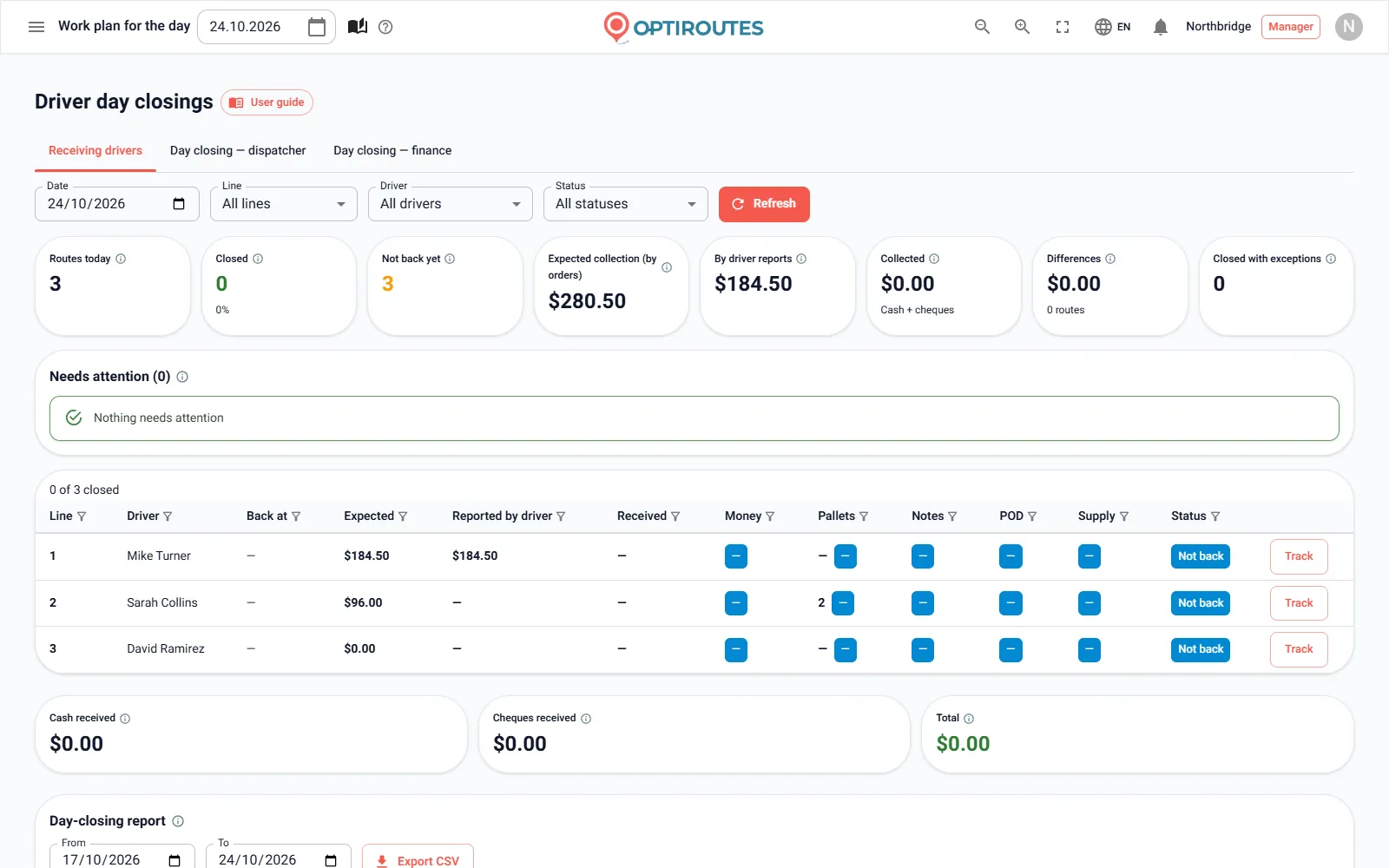
The first tab of the cash desk lists every route of the day with its closing state. Eight cards sum up the day: routes, closed, not back, expected, reported, received, differences and closings with exceptions. An alerts box gathers everything that needs handling — cash gaps, missing pallets, deliveries not closed in POD and undelivered stops — by route and driver.
Each row carries five checks — money, pallets, notes, POD and supply — shown as green (fine), red (a gap) or blue (not checked yet). Until a driver declares the end of the day, the checks show a dash rather than zero, because nothing is checked yet. The dashboard refreshes itself every minute, and every column can be sorted and filtered.
| Status | Meaning |
|---|---|
| Not back | The driver is still on the road and has not declared the end of the day. |
| Awaiting closing | The driver declared and finished; the desk has not started. |
| Draft | The desk started entering and saved a draft; the day is still open. |
| Closed | Closed for good, every check fine. |
| Closed with exception | Closed for good with a documented gap and a reason. |
| Needs attention | A gap or problem on a day not yet closed. |
Receiving a driver customer by customer
The driver closing screen is built for a tablet at the depot. It lists the route's customers in stop order, each with a POD chip, the collection (expected, reported by the driver and received) and a small tick for every check done. Tapping a customer opens a panel with each document and a large tick button per check — for example red stamp and stamp; you add your own checks in the ready remarks settings.
For a cash customer the panel takes the cash, cheques, number of cheques and a cheques note, filled in from the driver's report until you type something else, with the live gap beside them. The route totals are the sum of the customers and are never typed by hand. Quick filters show all customers, those not checked yet, cash customers or customers with issues. The driver's withdrawals and expenses of the day are shown for context, because they often explain a cash gap.
Pallets, plastons and gap reasons
When pallet reporting is on, the driver records the pallets collected at each stop, and the desk types how many came back against that expectation; a gap is flagged and can carry a note. Plastons are counted as received, with the driver's number shown for information. Any cash gap needs a reason before the day can close — picked from your prepared gap reasons in one tap, or typed. The message under the close button says exactly what is still missing: a gap reason, the name of who received the driver, or the confirmation tick. Closing notes take prepared day-closing remarks — each click appends one — or free text.
Closing, reopening and handing over to finance
Confirm and close the day locks the driver's day for good; Save draft keeps what was typed and leaves it open. What is saved: who closed, when, who received the driver, every amount, reason and note. A closed day is read-only. If a driver's reports arrive after closing, a manager can reopen the day with a written reason, and who reopened it, when and why goes into the closing notes.
Once the dispatcher has received their drivers, they close their own day: how much cash, how much in cheques and how many cheques they hand to finance, with a reason for any difference. Close to accounting does it in one tap with exactly what was received from the drivers. In the finance day closing, finance records what it actually received against every dispatcher's handover; after it is closed, a manager must reopen it before any dispatcher closing of that date can change.
Two e-mails go out automatically: after the day is closed, every paying customer gets a receipt with the amount, date and route, and on close the driver gets a deposit confirmation with the amounts handed over, who received them and when.
Reports for accounting
The range report lists every driver closing between two dates, one row per route and day, with day subtotals and totals reported, received and different. Export CSV downloads it for Excel with amounts as numbers, plus columns the table lacks — cash and cheques apart, gap reason and who received the driver. The finance closings table offers the same for finance days, up to 92 days at a time; a monthly file for the accountant is a month's range and one click. For one driver's month, pick the month, filter the driver column and export exactly those rows.
Who does what at the cash desk
A dispatcher receives drivers and closes their own day, and sees the finance part as view only. Finance lands on the cash desk after sign-in, closes drivers' days and the finance day. A manager does everything, including reopening closed days. Planners do not see the cash desk. Staff who receive drivers in the yard can also work from a phone or tablet: a user with cash desk access signs in to the driver app and gets the cashier's day list and closing screen there.
Try a full day — collection in the app and closing at the desk — during the free trial.
3-day free trial · up to 50 addresses a day · no credit card
Frequently asked questions
How does OptiRoutes know which customers pay in cash?
A customer whose name contains the word for cash, in any supported language, is treated as a cash customer. The driver sees a currency mark and gets a collection alert at that stop.
What if the collected amount differs from the amount due?
The driver must choose a gap reason in the app, and the desk must give a reason before closing. Both figures are kept, so the gap is documented, not hidden.
Can a closed day be corrected?
Yes, by a manager. Reopening asks for a reason, the day returns to draft, and the reopening is recorded in the closing notes.
Do customers get a receipt?
Yes. After the day is closed, every paying customer with an e-mail on the customer card gets a receipt with the amount, date and route.
Can we export the closings for our accountant?
Yes. The range report and the finance closings table both export to CSV, with amounts as numbers and the gap reasons included.
Start free trial — 3 days, no card
3-day free trial · up to 50 addresses a day · no credit card