
Delivery software with cash collection
Delivery software with cash collection should do more than add an amount field to the driver app. It should tell the driver what is due, record cash and cheques with a reason for every gap, let the office count each driver against the reports, and give accounting a clean report. Here is a checklist, OptiRoutes' answers, and three alternatives.
Updated:
Why does cash collection still matter in delivery?
Cash has not disappeared from deliveries. In the euro area, the ECB found that cash was still used in about half of point-of-sale transactions in 2024, and in the United States the Federal Reserve's payment diary counted cash in 14% of consumer payments that year — see our last-mile delivery statistics for the sources. For distributors serving small shops, kiosks and restaurants, a share of customers still pay the driver in cash or by cheque, and that money has to reach the office complete and explained.
What should delivery software with cash collection do?
- Know which customers pay on delivery, without a separate list the driver has to remember.
- Show the amount due at the stop, from the order.
- Record cash and cheques separately, with the number of cheques and a note such as the bank.
- Require a reason for every difference, from a prepared list.
- Make the driver declare the day, so what they bring back can be compared with what they reported.
- Let the office receive each driver customer by customer, with the documents and the money together.
- Keep an audit trail: who closed the day, when, who received the driver, and why a closed day was reopened.
- Hand over between roles, from the dispatcher to finance, with differences explained.
- Send receipts to paying customers.
- Export reports that accounting can sum in a spreadsheet.
How does OptiRoutes meet each point?
| Checklist point | OptiRoutes |
|---|---|
| Which customers pay | A customer whose name contains the word for cash is a cash customer, marked with a currency sign in the driver’s stop list. |
| Amount due | Marking arrival at a cash customer opens an alert with the amount due per the order; without a price it shows “amount unknown”. |
| Cash and cheques | The collection screen records cash, the cheques amount, the number of cheques and a free note. |
| Reason for differences | When collected differs from due, the app requires a reason from the prepared cash gap remarks. |
| Driver declaration | At the end of the day the app shows the totals per the reports and the driver declares what they bring back. |
| Receiving the driver | The driver day closing lists every customer with its documents, V checks per document, and the cash and cheques received against the report. |
| Audit trail | Every closing saves who, when, who received the driver, every amount, reason and note; only a manager can reopen a closed day, with a reason. |
| Handover between roles | Dispatcher day closing hands cash and cheques to finance; finance day closing reports what was received. |
| Receipts | After the day is closed, each paying customer with an e-mail gets a receipt; the driver gets a deposit confirmation. |
| Reports | A range report with day subtotals and CSV export with amounts as numbers; a finance closings table with totals. |
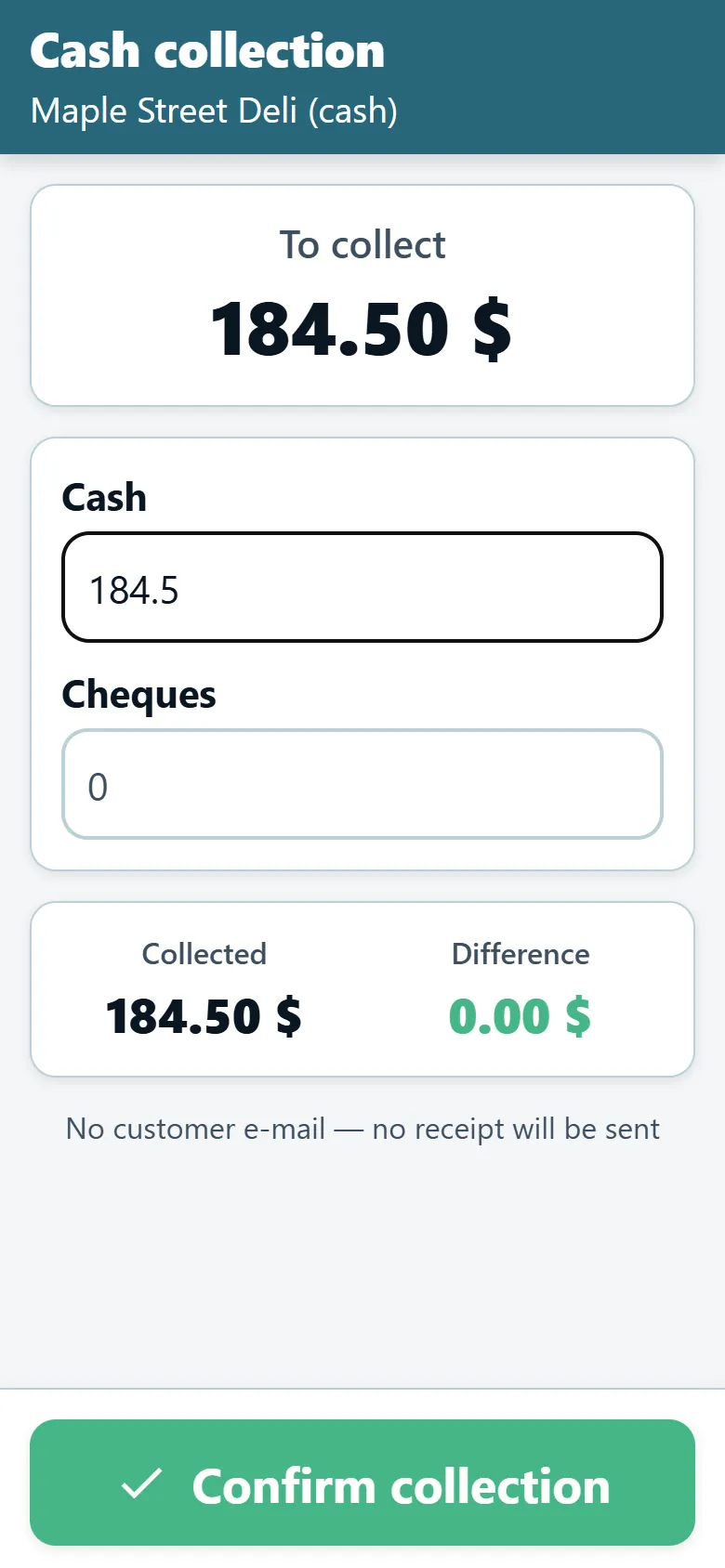
More detail on the cash and day closing page and the cash on delivery distribution industry page.
What else comes back with the money?
In distribution, the driver returns with more than cash: signed delivery notes, stamped documents, pallets and plastons. The OptiRoutes driver day closing handles them in the same pass. Each document of a customer gets a V button per check you define — for example a red stamp or a stamp — and the POD state comes automatically from the app. Pallets returned are counted against what the driver reported collecting, with a gap flagged, and plastons received are recorded as the desk's own count.
The daily dashboard sums the day in eight cards — routes, closed, not back, expected, reported, received, differences and closings with exceptions — and an alerts box gathers cash gaps, missing pallets, deliveries not closed in POD and undelivered stops by route and driver.
Which alternatives offer cash on delivery?
Three alternatives whose own websites mention cash on delivery or payment collection by drivers, as checked on 24 October 2026. We describe only what their pages say.
Track-POD
Track-POD describes delivery management software with an electronic proof of delivery app, for small and mid-sized businesses. Its cash on delivery page says the dispatcher specifies a COD amount when creating or importing an order, and the driver collects the payment and enters the same amount in the app for the job to be completed. Its pricing page lists cash on delivery among the driver app features and offers a trial without a payment card. (track-pod.com/cash-on-delivery, checked 2026-10-24)
Detrack
Detrack presents delivery management software for any business that runs its own fleet, with electronic proof of delivery that can require inputs such as a payment amount. Its help center explains a cash on delivery feature: the admin enters the amount to be collected for a job, and the driver enters the paid amount in the app, which can be made mandatory. Its pricing page offers a 14-day trial with no credit card required. (help.detrack.com, checked 2026-10-24)
Zeo Route Planner
Zeo offers a route planner for fleets and a mobile route planner for individual drivers. An article on Zeo's own site explains that a fleet manager can enable drivers to collect payments at the time of delivery, recorded in the driver app as cash, online or pay later. (zeorouteplanner.com/cash-on-delivery-orders, checked 2026-10-24)
How do you test cash collection before you commit?
Run one real day with three cash customers and deliberately create the problems you see every month: a customer who pays less, a customer who pays by two cheques, and a cash customer whose report the driver forgets. Then close the day in the office as you would on paper and check three things — whether the system caught each problem before closing, whether the reason is recorded where accounting will find it, and how long the closing took.
In OptiRoutes, prepare the cash gap reasons in Settings → Ready remarks first, put prices on the cash customers' orders so the amount due is known, and give them e-mails if you want receipts. The free trial runs 3 days with up to 50 addresses a day, without a card; after it, pricing is $49 per line per month, less per line as you grow.
Close a real cash day in OptiRoutes.
3-day free trial · up to 50 addresses a day · no credit card
Frequently asked questions
Does OptiRoutes support cheques as well as cash?
Yes. The driver records cash, the cheques amount, the number of cheques and a cheque note, and the cash desk counts cash and cheques separately.
What if a driver forgets to report a collection?
A cash customer delivered without a report shows as missing; the driver completes it from the stop list before ending the day, and the app asks before declaring a day with missing cash reports.
Can a finance user reopen a closed day?
No. A finance user can close but not reopen; only a manager can reopen a closed day, with a written reason that goes into the closing notes.
Do customers get a receipt?
Yes. After the day is closed, every paying customer with an e-mail on the customer card gets a receipt with the amount, date and route.
Is cash collection an extra module?
No. The cash desk is part of OptiRoutes, and pricing is the same per line: $49 per line per month, less per line as you grow, by the monthly average of lines a day.
Start free trial — 3 days, no card
3-day free trial · up to 50 addresses a day · no credit card